
Drilling to details is a powerful tool that allows the user to see a complete list of employee or requisition ID-level values that fit a description. This can be especially useful when it is important to know which employees, requisitions, or candidates fit a specific description. This article will walk you through how to drill to details and is broken into two parts:
1. Hover over the area of interest on the dashboard.
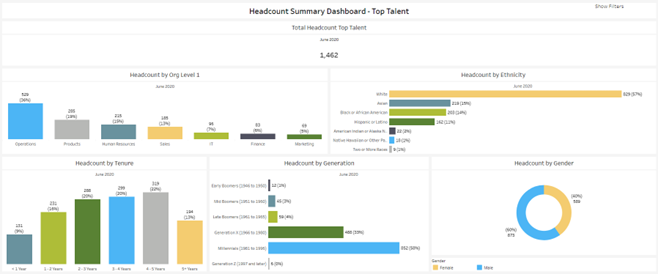
For example, if you are interested in top talent employees that are Early Boomers (1946 to 1950), hover over the corresponding row on the Headcount by Generation chart. If a link appears at the bottom of the hover, then a detail list is available for drill-down. In this case, it is titled ‘Top Talent 1’.
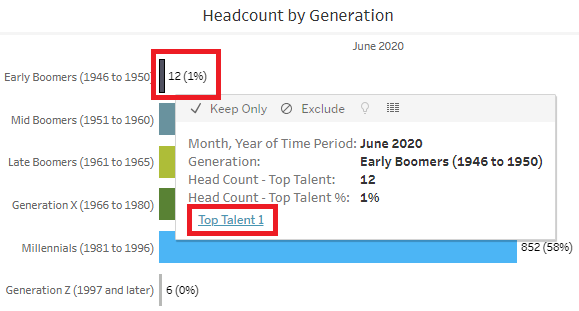
2. Click the link to the detail list.
Clicking the link will bring you to the detail list, filtered to the 12 employees that are Top Talent and Early Boomers.
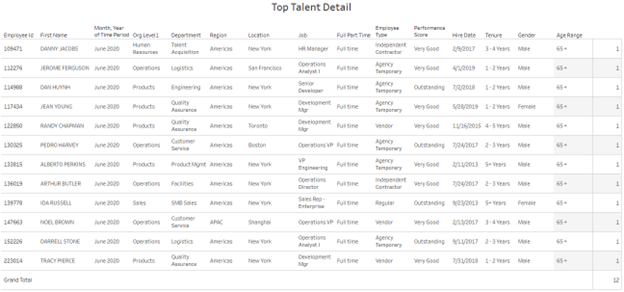
This list can then be exported. To learn more please visit our downloading guide.
Drilling to details can be very useful when investigating nulls.
For more ways to slice and dice your data, check out Filtering 101.