
Nulls appear when a data value does not exist in a database. In this article, we will walk through the two data scenarios that cause null values to appear, and how to solve them.
There are two scenarios that cause nulls to appear:
- The actual data does not exist in the file.
- The field is coming from a mapping file and the data is unmapped.
Scenario 1: The Data Does Not Exist
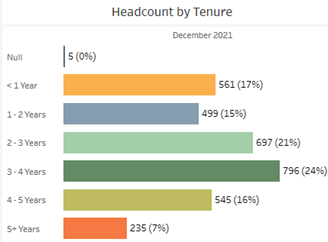
A common source of nulls is incomplete data. For example, in the image below there are five nulls in the Headcount by Tenure bar chart.
1. Drill down to the detail list.
After drilling-down to the Employee Detail, we can see the Employee IDs that have a null tenure value.
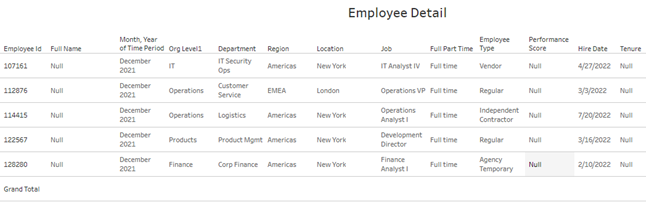
Now that we have the Employee IDs of the employees with null tenure values, we can look them up in the data.
2. Search for the Employee ID in the data.
In the data file that contains the Hire Date that Tenure is calculated from, filter to the Employee IDs that are showing nulls.

After filtering down to these Employee IDs in the data, there is no Hire Date listed. Tenure cannot be calculated without a Hire Date and therefore is null in PeopleInsight.
How can this be solved?
To resolve a null that is caused by missing data, the missing values need to be added to the data file. Then, the updated file needs to be uploaded to PeopleInsight.
Scenario 2: The Data is Unmapped
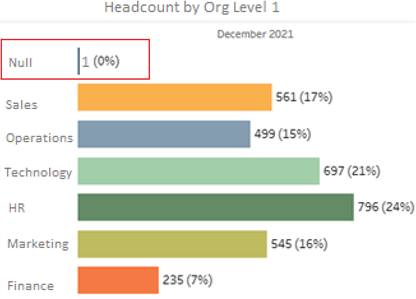
Nulls can also appear when a value that comes from a mapping file is unmapped. For example, in the image below there is one null in the Headcount by Org Level 1 bar chart.
1. Drill down to the detail list.
After drilling-down to the Employee Detail, we can see the Employee ID that has a null Org Level 1 value.

Now that we have the Employee IDs of the employees with null Org Level 1 values, we can look them up in the data.
If you are unsure how to drill down to a detail list, check out our guide on drilling to details.
2. Search for the Employee ID in the data.
In the data file that contains the field that maps to Org Level 1, filter to the Employee IDs that are showing nulls.

In this case, Org Level 1 is mapped from the Job Code value. We can see in the data that the Job code is “ABC123”. This value needs to be mapped in the Org Level 1 Mapping file.
3. Look at the Mapping File
If this value is either not present in the mapping file, or not mapped then Org Level 1 will appear null for the employee.
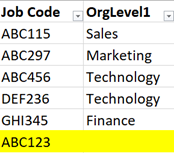
In this case, “ABC123” is present, but unmapped, leading to the null in PeopleInsight.
How can this be solved?
To resolve a null that is caused by an unmapped value, the unmapped value needs to be added to the mapping file. Then, the updated mapping file needs to be uploaded to PeopleInsight.