
HR Learn has the ability to track user attempts at the module level of a course enrollment. You can find this data via the activity page of a user’s course enrollment, and in a “User Course Transcripts” report export.
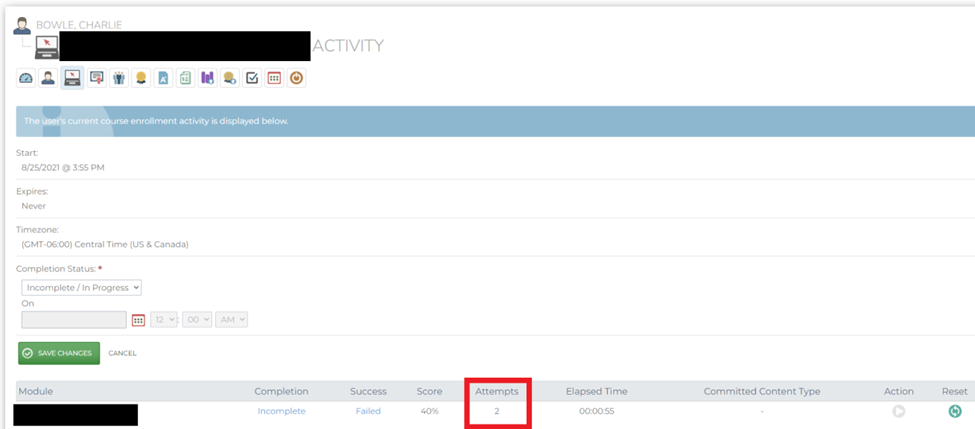
What is an Attempt?
With the launch and close of a module in the system, the SCORM package will send an entry value (cmi.entry value) and an exit value (cmi.exit value) to the LMS. Per SCORM standards, an attempt is defined as an entry and exit value with nothing in it (an empty value). When HR Learn sees an empty entry and exit value for a user, it will track an attempt in the database.
SCORM packages will typically set a user’s cmi.exit value to “suspend,” which tells the LMS that the user is not yet complete for that attempt of the module. This indicates to the LMS to wait and hold the attempt until the user can come back, resume, and complete the module.
How can I Increment Attempts on Each Launch of a Module?
On the module settings page in HR Learn, you can override the settings configured in the SCORM package and force the attempts in the LMS to increment each time a user launches and closes the module. If you are looking to enable this behavior, toggle to the “Content” tab of a module and check the box that says, “Override cmi.exit requirements and increment attempt count on each launch.”
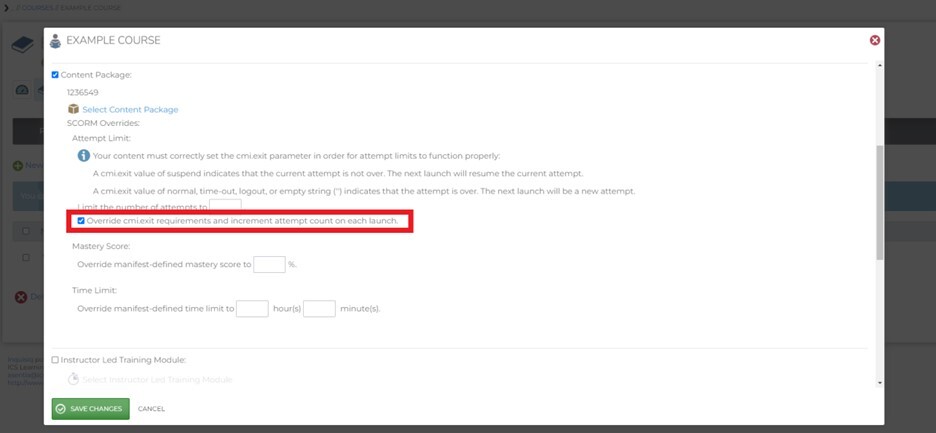
When this checkbox is selected, each time a user opens and closes the module, an attempt will be tracked in the LMS. You will see this data via the activity page of a user’s course enrollment, and in a “User Course Transcripts” report export, as mentioned above.