
If your end users utilizing Gmail email addresses are seeing delayed notifications for all email notifications or a specific type of email (e.g. password reset emails), please read about this issue in further detail below.
The issue with the delays in the receipt of emails being sent to Gmail addresses is tracing back to the use of a sending alias on the “From” address in the established notification. The HR Learn product allows you to specify a “From” address to mask the email’s true origin of coming from “no-reply@inquisiqlms.com” (the HR Learn email server), as a branding concept. Gmail has recently been tightening their spam/phishing checks so emails to Gmail addresses are going through extra scrutiny and “alias” address emails could be particularly targeted as they are attempting to hide the true sender – and hence the delay by Gmail in allowing those emails to enter into it’s email system.
Please note that emails without that “From” masking (sending alias), that are sent directly from “no-reply@inquisiqlms.com,” are going straight through to the recipients’ accounts without much delay.
This issue is not a system issue nor is it related to our "no-reply@inquisiqlms.com" emails. It is a behind the scenes “email server to email server communications” issue, with the delay on the Gmail acceptance of email side. If you are encountering this issue with your end users, the simplest solution would be to remove the “From” address aliasing your notifications and just allow the email notifications to come though from their true origin "no-reply@inquisiqlms.com".
While it is unfortunate that email notifications are being delayed to Gmail email addresses, we cannot control what 3rd party servers do to verify that emails are not spam/phishing emails. As email providers get stricter in their efforts to vet spam/phishing attempts, your organization must have appropriate things in place to be able to make our system emails appear to originate from you, or understand that the email notifications will originate from us and our “no-reply@inquisiqlms.com” email address.
Our HR Learn Product and Development Team has recently made changes to the email text of the password reset emails to hopefully assist in getting these emails through phishing filters. Please note, however, that we are still unable to directly work with Google or any other 3rd party on any preventions they have in place as we have no control/input into their operations.
Please reference the below article from CNN about the Gmail delay issue and spam filters: https://www.cnn.com/2022/08/11/politics/google-spam-filters-campaign-emails/index.html and regularly check the media and industry publications for ongoing information regarding how these service providers are constantly upgrading spam/phishing filters in an attempt to keep their users safe from spam and phishing.
There are three solutions to solve this known issue with users' email notifications and password resets being delayed:
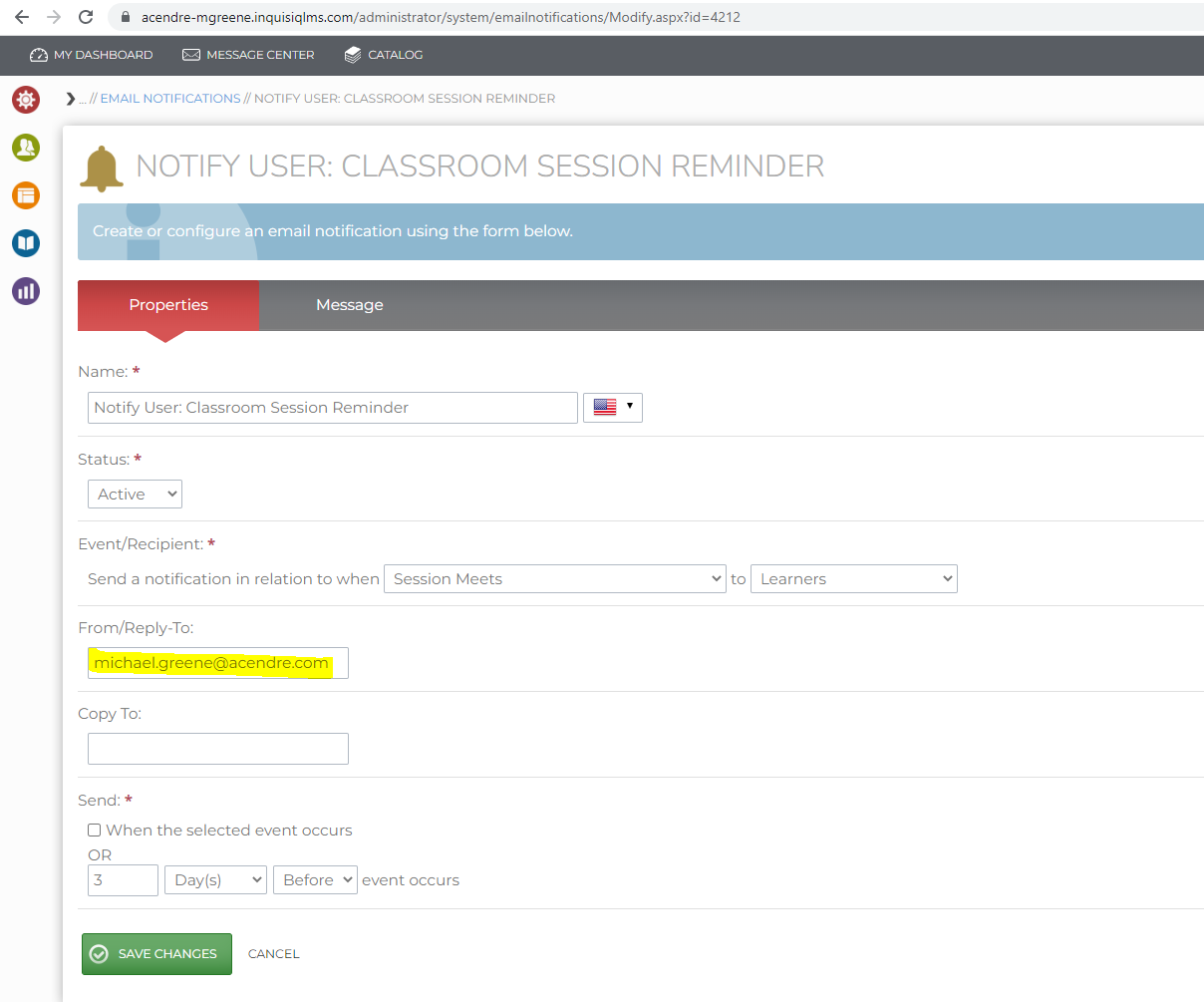
1. Remove any alias from email notifications. See screenshot below to get rid of the delay.
2. You (the HR Learn client) can add an SPF record to your domain’s DNS that lists our mail server’s IP address (52.2.24.137).
This would help with spam checks as that indicates “this IP address is allowed to send email from my domain.” Example, if the “From” address you are using is myemail@mydomain.com, you would add the SPF record to the DNS for mydomain.com. This is whitelisting our email domain.
Here are other IP addresses that can be white listed in addition to 52.2.24.137:
- 107.21.78.219
- 52.2.24.137
- 18.234.48.251
- 18.234.183.76
3. Understand that there will be a delay when a third party like Google is utilized as they have spam filters in place that are outside of our control.