
HR Learn LMS Release 2.4 will be deployed on Friday, November 17, 2023 between 8:00pm - 12:00am EST and contains the enhancements below.
Enhancements
“Group Owner” functionality for groups
We have added the ability to assign “Group Administrators” to a group. This functionality will allow you to assign system users as an Administrator for a group, and allow you to choose one or more of the following permissions that “Group Administrators” will have over the group:
- Approve self-enrollment of courses for group members
- Perform user management functions for group members (equivalent to User Manager permissions under Roles)
- Run reports on group members
System & UI Changes:
- A new tab “Group Administrators” is available when editing the properties of a group.
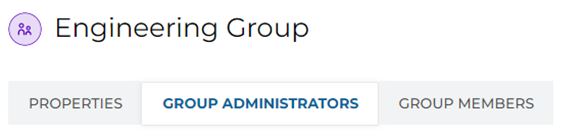
(Group Administrators tab)
- You can select the permissions you want to establish for administrators of the group.
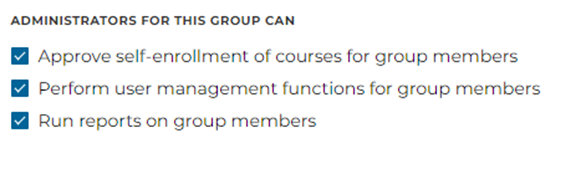
(Group Administrators permission options)
- You can assign administrators to the group by clicking the Add Administrator(s) button.
(Add Administrator(s) button)
- This functionality applies to both the legacy and new UIs.
Look back threshold setting for course completions within learning paths
We have added the ability to configure the “look back” period for how completions of a course attached to a learning path are credited toward the learning path when that course was completed prior to enrolling in the learning path.
Previously, the system would look back at course completions within 1 year prior to the learning path enrolment start date to credit course completions toward the learning path. Now, that “look back” period is configurable.
System & UI Changes:
- A new option “Look Back” is available on the learning path properties page.

(Learning Path properties look back setting)
- For existing learning paths in the system, the setting will be defaulted to the current system setting of 1 year.
- For newly created learning paths, this setting will have to be set if a look back period is desired.
- Setting the option of “No Look Back” means that prior course completion history will not be creditable toward courses attached to the learning path.
- This functionality applies to both the legacy and new UIs.
Other minor feature additions
- Modified the login form label for “Username” to reflect the value set for that field in User Field Configuration.
- Modified the ILT Roster Widget in the legacy UI to allow sorting by session start date.
- Added “Active”, “Inactive”, and “Online” filters to the user listing page. This applies to the new UI only.
- Added the ability for any user with the “System Administrator” role to view all surveys and quizzes, regardless of creator.
- Added a uniquely generated “Certificate Code” to certificate award records.
- Added the field “Session Timezone” to Course and Catalog Dataset for ILT session reporting.
- Added the field “Created Date” to Course and Catalog Dataset for reporting on when objects were created.
- Added the field “Course Estimated Length” to Course and Catalog Dataset for reporting on estimated length of course objects.
- Added the field “Enrollment Type” to Course Transcript and Learning Path Transcript datasets to report on how an enrollment was granted to the user (i.e. “Self-enrolled”, “Group-inherited”, “Ruleset-inherited”)
Bug Fixes
- Corrected an issue where description text areas for certifications were allowing more than the character limit of 512.
- Corrected an issue where the masthead logo was not linking back to the portal’s home page.
- Corrected an issue where some email notifications were being sent to disabled user accounts.
- Corrected an issue in the new UI where the percentage complete display for course enrollments listed on “My Learning” was displaying 5% before the user ever launched the enrollment.
- Corrected an issue where Zoom attendee synchronization was only synchronizing the first 30 attendees for an ILT session.
- Corrected an issue where UI text was not being translated in the course launcher.
- Corrected an issue where bulleted lists were being displayed as numerical lists in object descriptions.
- Corrected an issue in the new UI where the “No end date” checkbox was checked for enrollments with a lifespan end date.
- Corrected an issue where the Documents widget was not showing documents attached to Learning Paths.
- Corrected an issue in the new UI where the status of a Learning Path enrollment was not being shown correctly.
- Corrected an issue in the new UI where some auto-join rules could not be deleted.
- Corrected an issue in the new UI where Learning Path documents were not being displayed on the Learning Path details page.
- Corrected an issue with the “Hide Instructors” functionality for ILT not being properly enforced.
- Corrected an issue in the new UI where user additions to an ILT roster were being duplicated if clicking the “Add” button multiple times.
- Corrected an issue where users with permissions to view only certain custom datasets were able to view public reports for custom datasets they did not have permission to view.