
Enhancements
Multi-factor authentication (MFA) via Authenticator App and/or Email
We have added the ability for clients to enable multi-factor authentication (MFA) for logins to their LMS portal. This feature adds the ability to configure MFA methods for Authenticator App and/or Email, allowing clients to choose which method(s) to make available to users.
Multi-factor Authentication (MFA): FAQ’s
What methods of authentication will be available?
- Via an emailed code
- Via a code provided in an Authenticator App
Is MFA mandatory for all clients and users?
No. MFA will be an opt-in feature that you can enable on your LMS portal. The users in your LMS portal would then have the option to enable MFA for their user account.
Will the user experience be impacted if MFA is enabled on my portal?
The enabling of MFA on your LMS portal introduces an additional step to the login process for users. Clients should consider how this may affect user engagement relative to their security concerns before deciding to enable MFA on their LMS portal.
Do clients have to offer all authentication methods to users?
Not all methods of MFA are required. However, the Authenticator App is the option recommended for LMS portals that have users who exist outside of a single email domain. This option eliminates concerns relating to email delivery that can occur with the variety of email services used by LMS users not belonging to a single email domain.
Do users have to provide a code every time they login?
Yes, if MFA is enabled on a user’s account, they will have to enter an MFA code each time they sign into the LMS portal.
Is there a cost associated with MFA?
There is no cost associated with MFA via email or Authenticator App.
What happens if I don’t receive a code?
If you are using email MFA and do not receive a code, please attempt to sign in again to receive a code. If you still are not receiving an MFA code, please contact your LMS administrator.
What if a user gets a new phone?
If the user is utilizing MFA via an Authenticator App and they get a new phone, the Authenticator App will continue to work if their Authenticator App settings have been transferred to the new phone. Otherwise, they will need to have their MFA setting reset by an LMS administrator. Users utilizing email for MFA would be unaffected by a change in phone.
MFA System & UI Changes:
System & UI Changes:
- A group of settings for MFA is available on the "Configuration" page under "Login Setup."
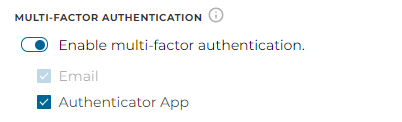
(MFA configuration setting)
- When MFA is enabled, users will be able to go to their "My Profile" page to edit their MFA settings.
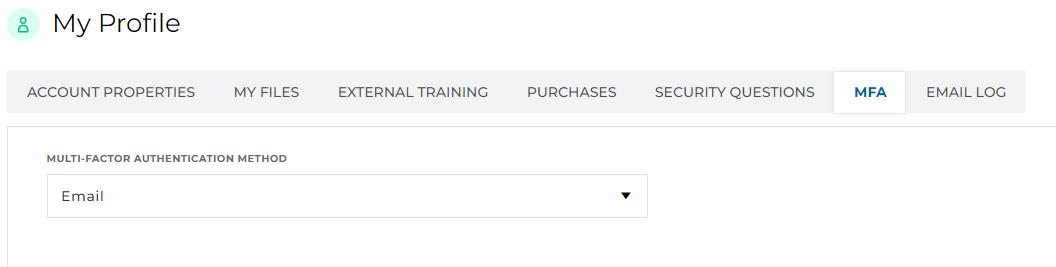
(My profile page with MFA options)
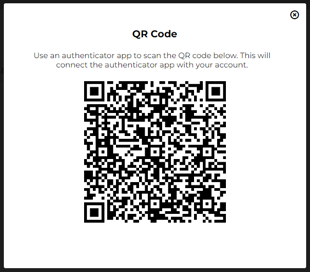
(QR code prompt for Authenticator App configuration)
- When a user signs in with an MFA method configured on their account, they will be presented with a prompt to enter an MFA code. To finish the sign in process, the user will need to enter the code from their Authenticator App or email, depending on their chosen MFA method.
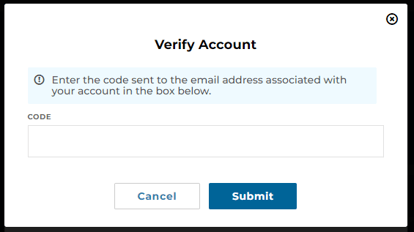
(MFA code prompt - Email MFA)
- This functionality applies to both the legacy and new UIs.
View proctored task data after task completion
We have added the ability for administrators to view proctored task data for task modules completed by a learner. This includes reviewing the document uploaded by the learner as part of the task, and any comments or notes placed on the task by the proctor.
System & UI Changes:
- A new clickable button under "Committed Content Type" is available on the course enrollment activity page for a learner.

(Course enrollment activity page)
- When this button is clicked for a module where the content type is a task, a pop-up will be launched that contains the details of the proctored task module.
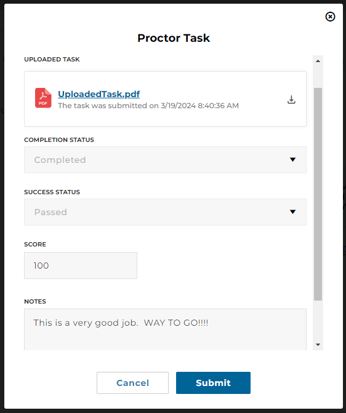
(Task proctoring pop-up)
- This functionality applies to both the legacy and new UIs.
New "My Courses" widget
We have added a new "My Courses" widget to the "My Activities" page in the new UI. This widget allows a learner to see an overview of the number of course enrollments they have "In Progress", "Overdue", and "Expired"; and provides a direct link to the learner's "My Learning" page where they can view all their enrollments.
System & UI Changes:
- A new "My Courses" widget is available on the "My Activities" page for learners.
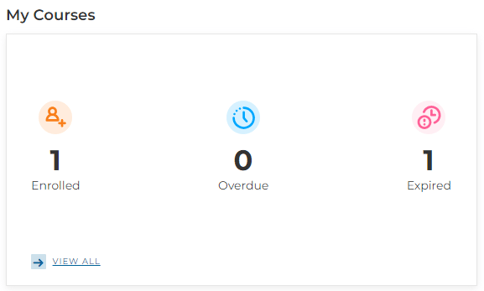
(My Courses widget)
- The "View All" link will take the learner to the "My Learning" page where they can view all their enrollments.
Other minor feature additions
- Added a "Task Proctored" email notification to allow learners, proctors, and/or administrators to be notified when a task has been proctored.
- Added the ability to create notes on a proctored task to provide feedback to users on submitted tasks. These notes can also be included in the "Task Proctored" email notification.
- Added a "User Password Changed" email notification to allow users to be alerted when their password has been changed. Note that this email notification is only triggered when a single user's password has changed, it does not apply to changes made through user batch uploads.
- Added course codes to listings of courses within learning path enrollment pages.
- Added course codes to the Transcript widget.
- Added "Module Order" field to the Course and Catalog Information dataset in reporting.
- Added "ILT Registration URL" and "Attend URL" fields for ILTs to the Course and Catalog Information dataset in reporting.
- Added "Course (Title Only)" field to the User Course Transcript dataset in reporting. This field contains the course title without the enrollment identifier appended to it.
- Added "Enrollment Creation Date" and "First Launch Date" to the User Course Transcript dataset in reporting.
- Added a "BCC" field to email notifications to allow blind copies of an email notification to be sent to a specific email address.
- Modified the masthead button editor to allow the order of buttons to be rearranged.
- Modified the "Merge Users" functionality to allow the merging of roles from source user account to destination user account.
- Modified the "Task Submitted" email notification to allow for Learner as a recipient option.
- Modified the sorting of items in the catalog to be in the configured "default order" when the user has no other sorting option selected.
- Modified the reporting of the "Content Resource" field in the User Course Transcripts dataset so that it is tracked against the content launched by the learner instead of the content currently linked to the module.
- Modified the assignment of supervisors to users in User Batch Upload to no longer be additive. Instead, the list of supervisor(s) provided in the batch will be the effective list of supervisor(s) for the user. This means if a user has "Supervisor A" and "Supervisor B" as their supervisors, and a batch is uploaded that only has "Supervisor A" as the user’s supervisor(s), "Supervisor B" will be removed as one of that user’s supervisor(s).
- Modified the configuration of rulesets to provide more logical validation of combined rules where the selected rule field(s) relate to courses. The following validations apply:
- If creating a rule for "Course Name," you must also create a rule for "Course Status" and/or "Course Completion Date"
- Any rules created for "Course Status" and/or "Course Completion Date" must also have a rule for "Course Name."
- If the ruleset is created for a course enrollment, the "Course Name" field rule cannot be for the same course you are creating the enrollment for.
Bug Fixes
- Corrected an issue where private reports a user was subscribed to were not showing in "My Report Subscriptions."
- Corrected an issue where configured OAuth sign in options are not being displayed on login forms embedded in home pages.
- Corrected an issue where duplicate course enrollments of an already expired course enrollment for a learning path are being created when new courses are added to the learning path.
- Corrected an issue where completion percentage set on a video content package is not being calculated correctly.
- Corrected an issue preventing download of a PDF certificate when the first or last name of a user contains a comma.
- Corrected an issue affecting upload of task resources to a newly created module.