
HR Learn LMS Release 2.6 will be deployed on Wednesday, September 4, 2024 between 10:00pm - 2:00am EST and contains the enhancements below.
Enhancements
Create course enrollments via batch upload
We have added the ability for administrators to enroll users in courses via batch upload. This will create a one-time enrollment of the course for all usernames listed in the batch upload file and will inherit the “self-enrollment” settings for “Due,” “Access from Start,” and “Access from First Launch” as configured in the course properties.
System & UI Changes:
- A new clickable button for “Bulk enroll users” is available on the course dashboard page under the “Actions” menu.
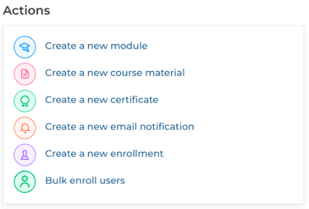
(Course dashboard actions menu with “Bulk enroll users” button)
- When this button is clicked, a pop-up will be launched that will allow you to upload a batch file containing the usernames of users you want to enroll in the course. Note that the “Due Date,” “Access from Start,” and “Access from First Launch” settings will be inherited from the course’s “self-enrollment” settings.
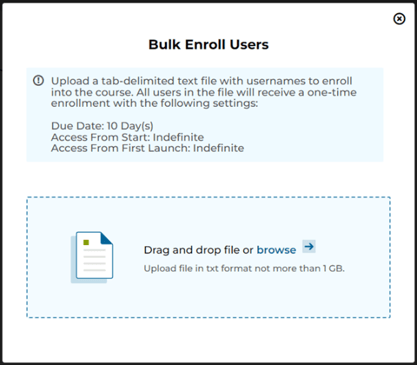
(“Bulk enroll users” pop-up)
- This functionality applies to both the legacy and new UIs.
Other minor feature additions
- Added functionality to prevent a user with administrator privileges from modifying or deleting their own enrollments.
- Changed the “infinite scrolling” functionality on listing pages in the new UI to a “View more” link at the bottom of those pages to enhance usability.
- Added functionality to allow for email logs to be searched by recipient email address for “external recipients.”
Bug Fixes
- Corrected an issue preventing multiple email addresses from being entered in the BCC field for email notifications.
- Corrected an issue where the session roster print view was displaying the cookie consent banner when printing a session roster.
- Corrected an issue where course completion override timestamps were not able to be saved due to a time zone conversion issue.
- Corrected an issue where timestamps in alerts and notifications were not being converted to the user’s local time zone in the UI.
- Corrected an issue with displaying course titles with special characters in catalog tiles.
- Corrected an issue with displaying user batch upload errors in the new UI.
- Corrected an issue with formatting timestamps according to the portal’s default locale in reports generated via report subscriptions.
- Corrected an issue with user logins when “simultaneous login” is disabled and the “login priority” is set to “latest.”