
Learner responses to quizzes and surveys are stored as content interaction data within the LMS. Once a user completes a module, you can then report on those learner responses by following the steps below. Open the Reporting menu from the Administrator Toolbar and create a new "User Course Transcript Report."
Select all the necessary user and course data fields that you want to pull into the report from the "Available Items" column. Under "Interaction," grab both "Learner Response" and "Correct Response." Move all highlighted items over to the "Selected Items" column using the arrow in the center of the page.
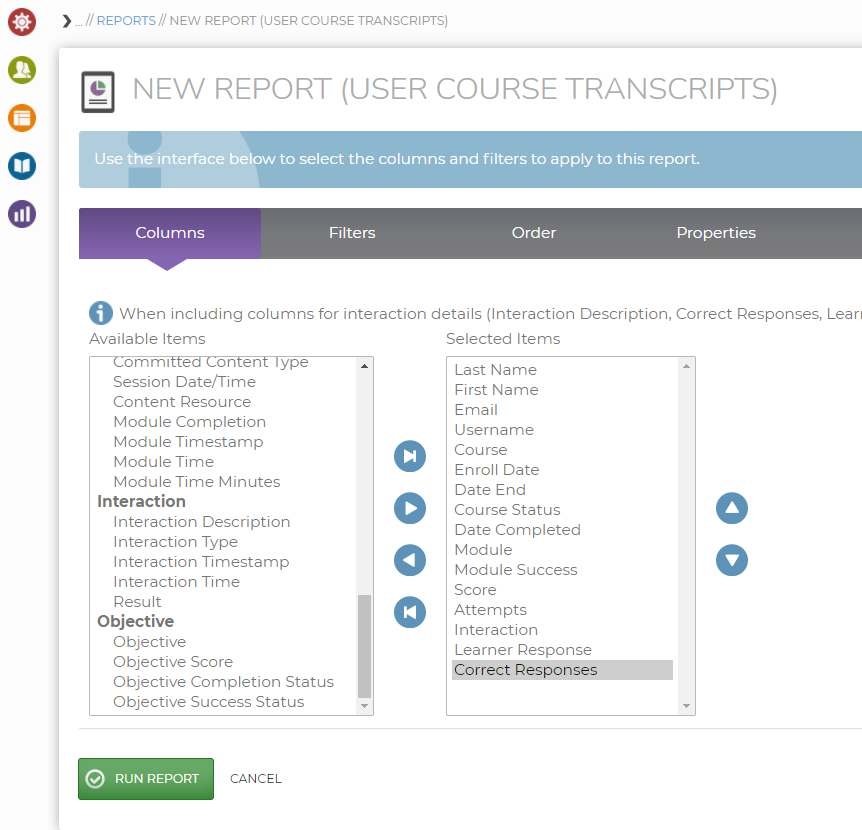
Click "Run Report" at the bottom of the page, or click on the other tabs to add filters or save the report for future use.
Download the file into Excel, or PDF, based on your preference. Filter down to the module level that contains the test you want to see the learners' responses for. Locate the "Learner Response" field to see what the user submitted for each test question inside the selected module.
