
Admins can now self-manage their organization’s multiple portals all by themselves. This means you can create new portals, update existing portals, manage the Content Distribution Hub (CDH), and create portal users.
- Below is the customer manager landing page. Here you can create or manage portals and create or manage users.
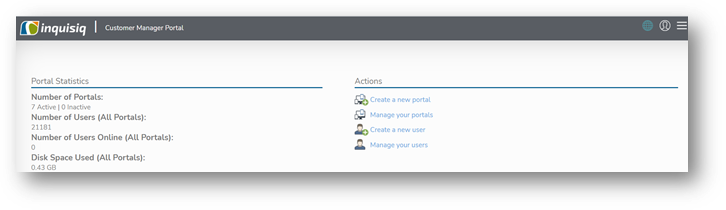
- Based on your contract you can create as many portals as you have purchased. Click on ‘create portal’ action to create a new portal. In the section you can choose a hostname for your new portal, select the languages which will be active on the portal and the features which will be available – all at a click of a button.
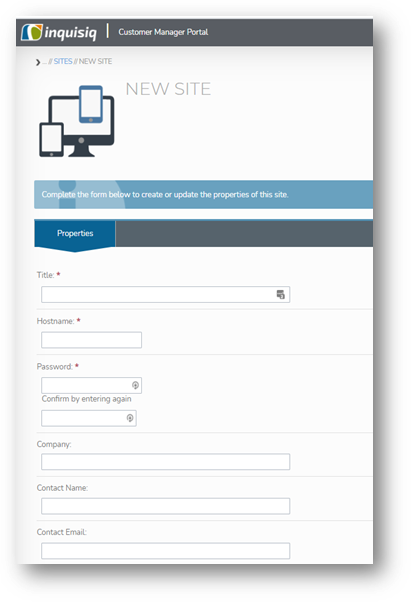
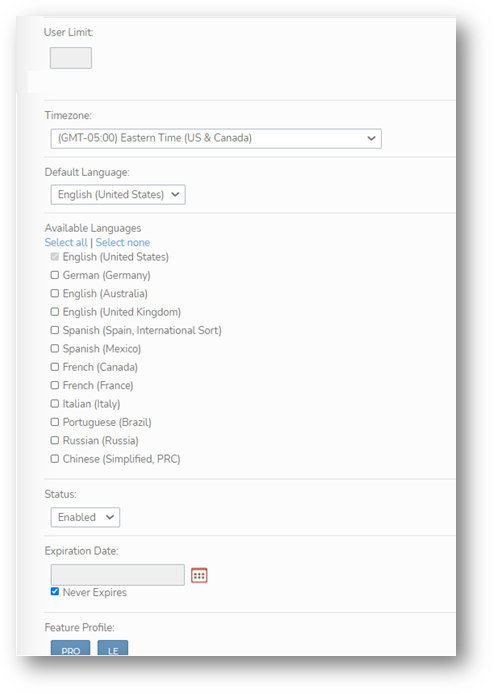
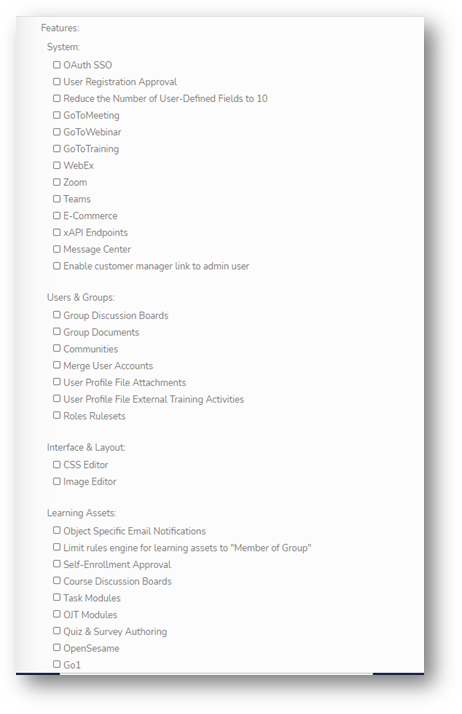
3. You can also update above displayed settings on existing portal in your multi-portal ecosystem.
4. As account admin you can create user and give them access to customer manager.
Feature Toggles
- System
- OAuth SSO - When this is checked, OAuth SSO providers (Google, Linkedin, Facebook, Clever, Okta, Azure AD, etc) can be configured on the configuration page of the portal.
- User Registration Approval - When this is checked, user registration approval can be turned on in the portal, requiring new user accounts to be approved by an administrator.
- Reduce the number of User-Defined fields to 10 - When this is checked, there will only be 10 user defined fields available in the user field configuration, rather than the default 20.
- GoToMeeting - When this is checked, GoToMeeting will be available to enable as a web meeting integration.
- GoToWebinar - When this is checked, GoToWebinar will be available to enable as a web meeting integration.
- GoToTraining - When this is checked, ToToTraining will be available to enable as a web meeting integration.
- WebEx - When this is checked, WebEx will be available to enable as a web meeting integration.
- Zoom - When this is checked, Zoom will be available to enable as a web meeting integration.
- Teams - When this is checked, Teams will be available to enable as a web meeting integration.
- E-Commerce - When this is checked, e-commerce can be configured to allow learning objects to be purchased in the portal.
- xAPI Endpoints - When this is checked, xAPI endpoints can be configured in the portal.
- Message Center - When this is checked, the message center will be enabled on the portal, allowing users to send and receive messages.
- Zapier - When this is checked, Zapier can be enabled in the portal.
- Users & Groups
- Group Discussion Boards - When this is checked, group discussion boards are available for all groups in the portal.
- Group Documents - When this is checked, documents can be uploaded to groups in the portal.
- Communities - When this is enabled, communities (groups) are available to join in the catalog.
- Merge User Accounts - When this is enabled, an admin is able to merge user accounts from the "Users" page in the portal.
- User Profile File Attachments - When this is checked, users and admins can attach documents to user accounts.
- User Profile File External Training Activities - When this is checked, users can upload external training to their account.
- Roles Rulesets - When this is checked, autojoin rulesets are available for roles.
- Interface & Layout
- CSS Editor - When this is checked custom CSS can be created for the portal.
- Image Editor - When this is checked, custom images can be uploaded for the portal.
- Learning Assets
- Object Specific Email Notifications - When this is checked, email notifications can be created for specific courses, learning paths, ILTs, and certifications.
- Limit rules engine for learning assets to "Member of Group" - When this is checked, all rulesets for all objects will only allow a "member of group" rule, rather than rules based on user fields or course completions.
- Self-Enrollment Approval - When this is checked, course can enable self-enrollment approval so that self-enrollment into those courses needed to be approved.
- Course Discussion Boards - When this is checked, discussion boards are available for all courses.
- Task Modules - When this is checked, course modules can have a task type.
- OJT Modules - When this is checked, course modules can have an OJT type.
- Quiz & Survey Authoring - When this is checked, the quiz and survey tool is available to create custom quizzes and surveys.
- OpenSesame - When this is checked, the OpenSesame Marketplace is available in the portal.
- Go1 - When this is checked, the Go1 Marketplace is available in the portal.
- Standalone Enrollment of ILT - When this is checked, standalone ILTs will appear in the catalog for enrollment.
- ILT Resources - When this is checked, the ability to add resources to ILTs is available in the portal.
- Learning Paths - When this is checked, learning paths are available in the portal.
- Certifications - When this is checked, certifications are available in the portal.
- Reporting
- Reporting PDF Export - When this is checked, the ability to export reports into PDF format is available in the portal.