
HR Learn comes populated with default user data fields that can be renamed and customized to fit your organization's need. You can also enable the available "User Defined Fields" that allow you create your own custom data fields to collect and display the data that you would like in your user profiles, self-registration form (user for self user account creation), reports, and certificates.. Use the User Defined Fields in HR Learn to create your own fields in user profiles.
From the administrator menu, click the Users & Groups tile, then click "User Field Configuration." Click the "Data Fields" tab, and scroll down to the bottom, where you will find the User Defined Fields.
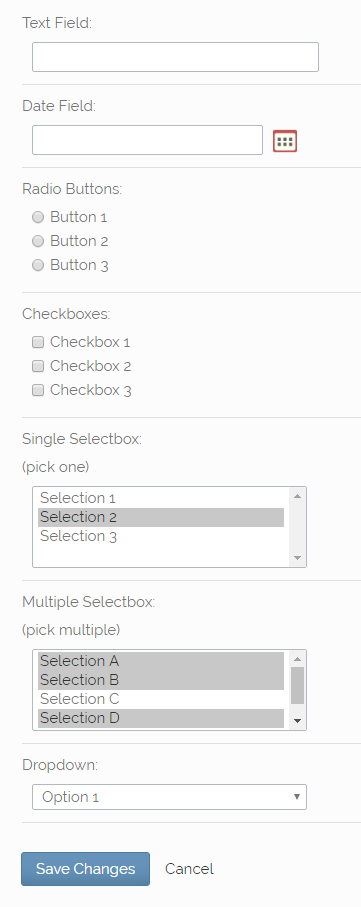
The user defined fields are different from the pre-set fields in that you can choose what type of field you wish for it to be. There are seven different kinds of custom fields that you can create in HR Learn:
Text Field - Allows user to input text
Date Field - Allows user to click a calendar icon and select a date from a pop-up calendar modal window
Radio Buttons - Allows user to click and fill the bubble next to one option from a list of options
Checkboxes - Allows user to click and check one or more boxes from a list of options
Single Selectbox - Allows user to select one option from a list of options
Multiple Selectbox - Allows user to select multiple options from a list of options
Drop Down List - Allows user to select one option from a drop-down list of options
NOTE: In regards to a Text field, for both user defined fields AND pre-set fields, you can limit what text the field will accept using regular expressions. This function requires familiarity with regular expressions, so DO NOT utilize this feature if you are not familiar with regular expressions.